B12NumbersV3
Base 12 Calculator and Clock
Published: 3/6/2026 | Updated: 3/6/2026
Tags: code portfolio, programming, java, processing, math, showcase
Overview
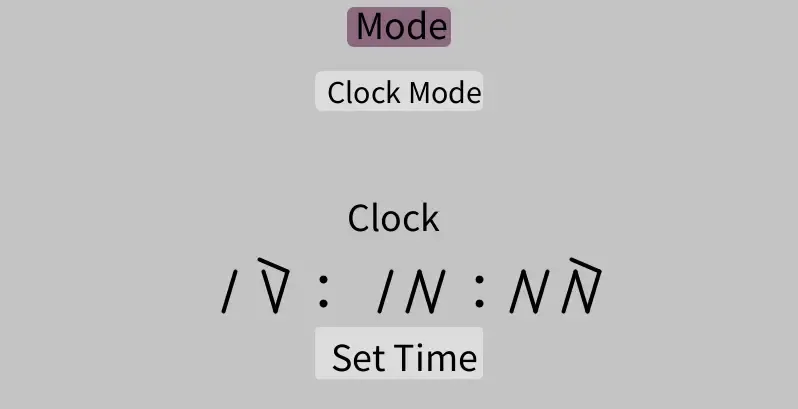
B12NumbersV3 is a calculator and clock application that allows you to measure time and perform calculations in base 12. A result of me being bored in an introductory programming course years ago.
The functionality includes a clock, stopwatch, and timer, all of which run slower than normal time, as days are broken into 24 hours/day, 48 minutes/hour, and 48 seconds/minute. Also included is a calculator for doing math operations in base 12.
The characters are designed after the ingenious Kaktovik Iñupiaq numerals, which were created by a group of middle schoolers in Kaktovik Alaska, to represent the base 20 counting system in Iñupiaq, their Inuit language. I take no credit for the design of the characters. I just co-opted the design for the development of this project because it is elegant and convenient to use for compound base number systems, and looks nothing like the Arabic numeral system.
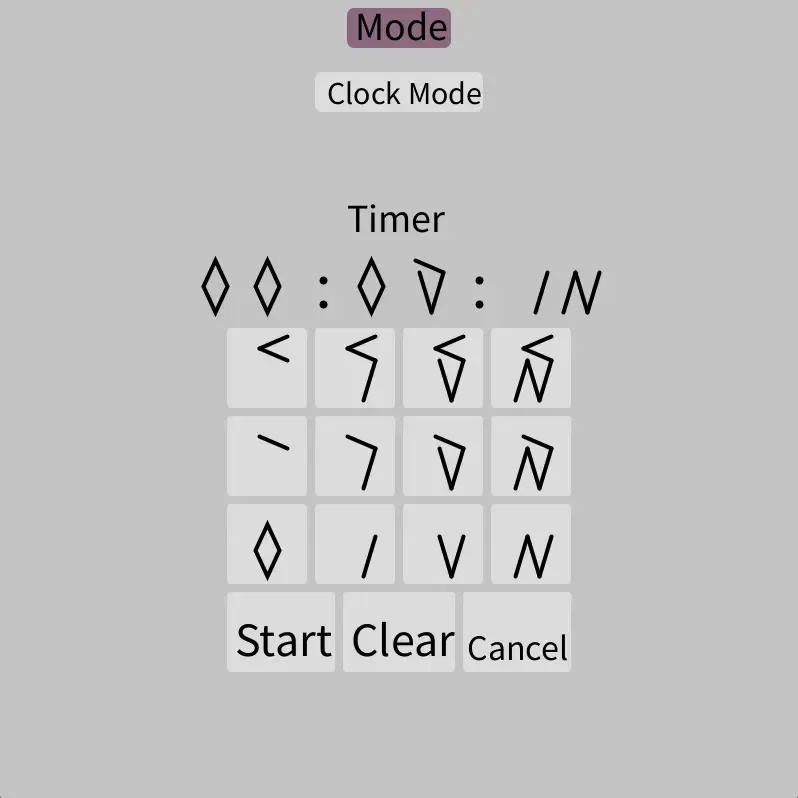
A screenshot of the B12NumbersV3 timer that showcases all the base 12 characters
As you can see above, vertical lines are multiples of 1, and horizontal lines are multiples of 4. That makes 10 equal to 12 in base 12. Decimal 11 is 2 horizontal ticks, and 3 vertical ticks. (8 + 3)
I had grander plans for this program, but once I got into the details of how to construct event handlers for the mouse, and discovered that singletons are not allowed in Processing, I decided to postpone this project indefinitely.
Some Interesting Technical Details
I wrote it in the Processing IDE, which is a Java-based language that is designed for creating interactive graphics and animations. It comes with mouse events and interaction hooks built into the root level, but it has no UI components out of the box.
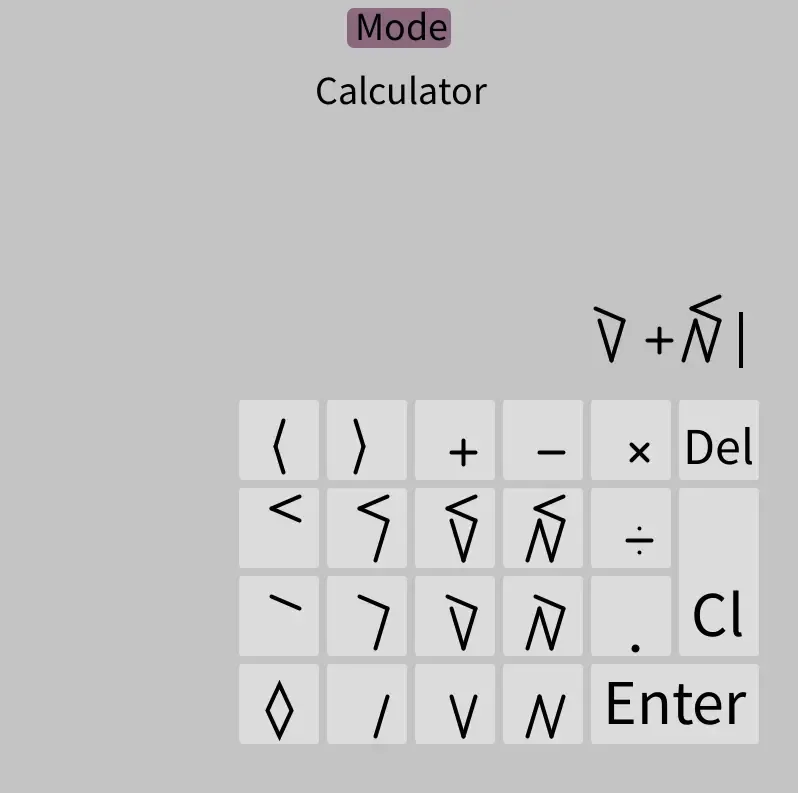
To make UI elements like the calculator pad and the clock face, I built a system to nest UI elements within each other and manage their position and size to create compound UI elements. That came with the issue of instantiating and destroying UI elements as needed, which would not be an issue except buttons need to know when they’re clicked.
In order for UI elements to detect clicks I built an event driven mouse handler system on top of the built in mouse events that allows components to subscribe to mouse events and handle them accordingly.
// MouseHandler.pde
class MouseHandler {
  private LiveMethodRelay[] mrs; // The listener array
  ...

  ...
  // This is used by outside objects to stick a listener in
  // the listener array
  void addRelay(LiveMethodRelay r) {
    ...
    mrs = (LiveMethodRelay[])append(mrs, r);
  }
  ...

  ...
  void cascade(char tag, float... data) {
    // clean() (not shown) removes dead reference from the
    // listener array
    clean();
    for (int i = 0; i < mrs.length; i++) {
      if(mrs[i].getTag() == tag){
        mrs[i].execute(data);
      }
    }
  }
}
That created a problem with instantiating and destroying UI elements, however, because when you store a reference to an object in java the garbage collector will not be able to collect it.
When a button is instantiated it registers itself with the mouse handler system, but now there are two references to the button. The one in the mouse handler system and the one in the UI element system. The UI system drops its reference to the button when the UI is re-drawn when the user switches modes, but that can’t trigger a listener reference removal because it’s not a method that can be hooked. That reference will stop the garbage collector from ever removing the old buttons from memory, even as more and more are instantiated. That’s a memory leak!
The solution (after much searching) was to use weak references to store the button references in the mouse handler system. Weak references are references that do not prevent the object from being garbage collected the way normal references do.
// MethodRelay.pde

// LiveMethodRelay extends MethodRelay and just adds
// a tag to the relay
public static class MethodRelay {

  /** Replaced the original strong reference with
      a weak reference so that relays will not disable
      garbage collection for the object they reference*/
  private WeakReference reference = null;
  ...
}
When the UI is re-drawn and the old buttons are removed, the program doesn’t need to know about it or do anything. The garbage collector will handle clean up the old buttons, and the mouse handler system can remove the dead reference next time a mouse event cascades through the system.
Math
The math works. Mostly. Base 12 is not a computer friendly number system and there are no systems with out of the box support for it. I managed the math with lots of custom parsing logic, type casting, and duct tape.
The numbers in base 12 are stored as arrays of custom digit objects. There’s still a lot of conversion back and forth with decimal though. For one, the current time is not available in base 12, and for two, there are no base 12 native math operations in Java. When the enter button is pressed on the calculator the array of digit objects is converted to a string made up of decimal numbers and math operators.
Calculator Math (dropdown to show code)
/** The workhorse of the the calculator functionality, B12Expression handles the
 * digits and math It stores only an array of digits, and using only that it can
 * evaluate expressions.*/
class B12Expression {
  private B12Digit[] expression;

  // Constructor
  B12Expression(){
    expression = new B12Digit[0];
  }

  /* Getters and setters not shown */

  // Evaluates the expression with exp4j and stores the result in the expression array
  void evaluate(){
    String evalString = parseDigits();
    Expression exp = new ExpressionBuilder(evalString).build();
    expression = new B12Float((float)exp.evaluate()).setPlaces(12).getDigits();
    println(exp.evaluate());
    dbout = str((float)exp.evaluate());
  }

  /** Takes the current state of the digit array, converts it to an expression in
   * base 10, and then outputs that as a string. It goes through each element of
   * the array, grouping numeral digits to be converted to complete numbers, and
   * sticking non-numeral character straight on. */
  private String parseDigits(){

    String valid = "+*-/"; // valid characters to accept
    String evalString = ""; // gets filled with the expression up for evaluation in base 10
    B12Digit[] cnum = new B12Digit[0]; // used to sum numbers as the array is parsed
    boolean cfs = false; // float status of currently building number


    // Parse expression[] into a base 10 string that can be evaluated mathematically
    if(!(expression[expression.length - 1].isNum() || expression[expression.length -1].getValue() == ')' )){throw new IllegalArgumentException("Invalid input");} // check that final character is a number or parenthesis
    for (int c = expression.length; c >= 0; c--){ // For each digit in the array, starting at the end

      int i = c - 1; // Convert counter to array index (counter starts one higher than the final index of the array)

      if (i == -1){ // At the end of the array, add the final number if necessary
        // add number to string if present
        if(cnum.length != 0 && cfs == false){
          B12Int num = (B12Int)convert(cnum,cfs);
          evalString = str(num.getValue()) + evalString;
          cnum = new B12Digit[0];
        }
        else if(cnum.length != 0 && cfs == true){
          B12Float num = (B12Float)convert(cnum,cfs);
          evalString = str(num.getValue()) + evalString;
          cnum = new B12Digit[0];
          cfs = false;
        }
        break;
      }

      // If there is no number currently being built and the current character is a number start building a new number
      if (expression[i].isNum() && cnum.length == 0){
        cnum = (B12Digit[])append(cnum,expression[i]);
      }
      // If the current character is a number and there IS a number currently being built add the character into the number
      else if (expression[i].isNum() && cnum.length != 0){
        cnum = (B12Digit[])append(cnum,expression[i]);
      }
      else if (expression[i].value == '.' && cnum.length != 0){
        if(cfs == true){throw new IllegalArgumentException("Invalid input");}
        cnum = (B12Digit[])append(cnum,expression[i]);
        cfs = true;
      }
      // If any other valid character just add it to the string after making sure to add the last built number if it exists
      else if (inStr(valid,char(expression[i].value))){

        // add number to string if present
        if(cnum.length != 0 && cfs == false){
          B12Int num = (B12Int)convert(cnum,cfs);
          evalString = str(num.getValue()) + evalString;
          cnum = new B12Digit[0];
        }
        else if(cnum.length != 0 && cfs == true){
          B12Float num = (B12Float)convert(cnum,cfs);
          evalString = str(num.getValue()) + evalString;
          cnum = new B12Digit[0];
          cfs = false;
        }

        // add character to string
        evalString = char(expression[i].getValue()) + evalString;
      }
      // In all other cases fail
      else{
        throw new IllegalArgumentException("Invalid input");
      }
    }

    return(evalString);
  }

  /** Converts an array of digits into a B12Int or B12Float respectively */
  private Number convert(B12Digit[] cnum, boolean isFloat){
    ...
  }

}
I didn’t implement my own math expression evaluator, the calculator just uses exp4j on the string of decimal numbers and math operators. Then the result is converted back to an array of digit objects and displayed. It’s not pretty or efficient, but it works as long as there is not too much floating point imprecision.
Closing Thoughts
Despite being a few years old, this is one of the projects I’m most proud of. I wrote it when I didn’t even know that event driven architectures were a thing out in the world. It was my first application that I completed that was a full scale application with a user interface and a lot of functionality.
I don’t think I’ll ever re-visit it like I originally planned, but it’s an important milestone in my software journey.
Comments
Loading comments…
I use cookies to prevent spam. To comment, please enable cookies.